
A reader
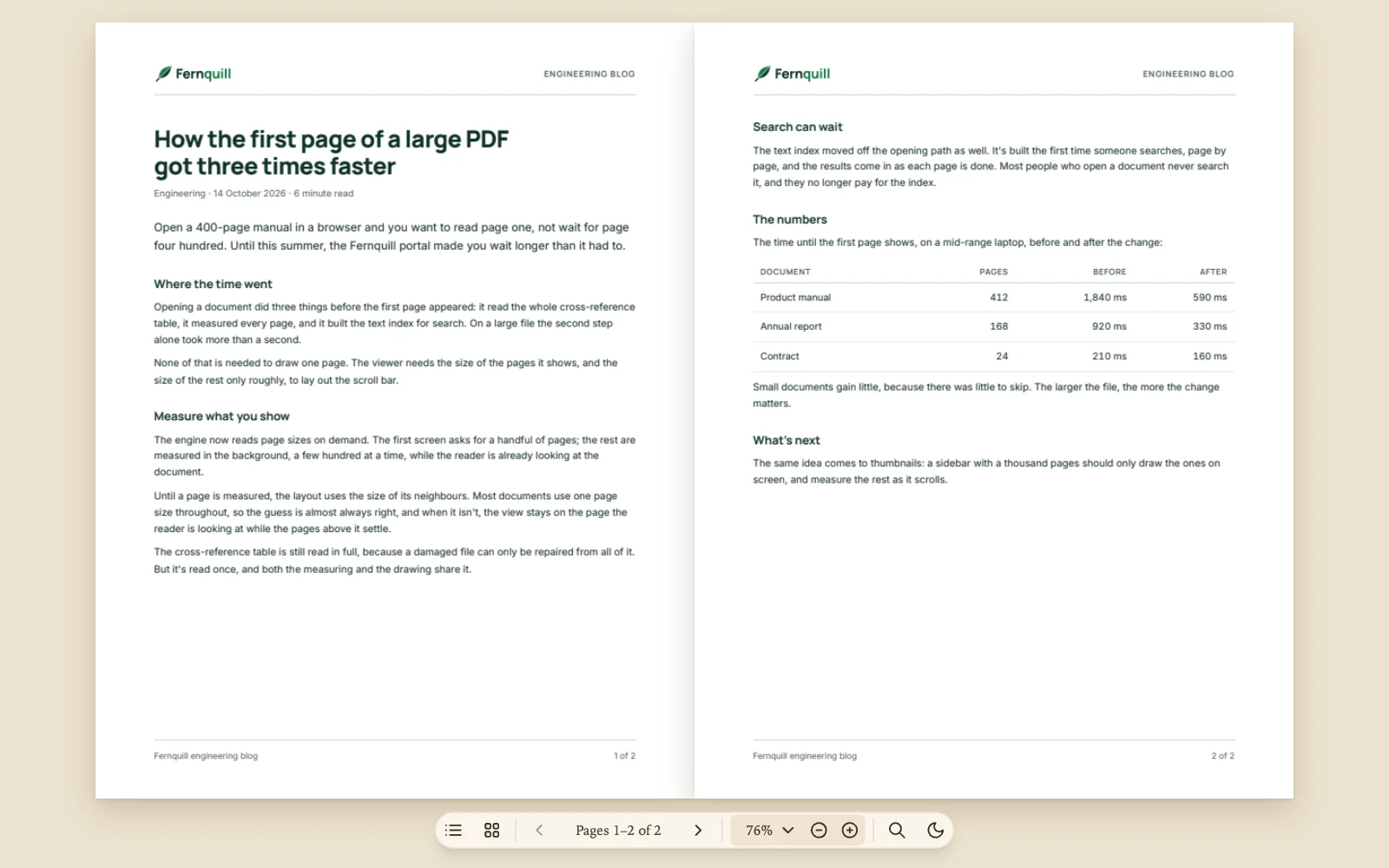
For people who read long documents and want nothing else on screen. There’s no toolbar: the pages open as a two-page spread lying on warm paper, a small pill floating below them holds every control, and the viewer writes its own words in a serif. Nothing can change the document, while search and copying still work.
reader.vue
<script setup lang="ts">
import { ref } from 'vue';
import {
  Button,
  PDFViewer,
  ToolbarItem,
  type ThemeConfig,
  type ViewerConfig,
} from '@embedpdf/viewer-vue';

const article = '/pdfs/article.pdf';

// Paper by day and a warm dark at night, with a book's serif for the viewer's own words in both.
const book: ThemeConfig = {
  tokens: {
    radius: '10px',
    font: "'Iowan Old Style', 'Palatino Linotype', Palatino, Georgia, serif",
  },
  light: {
    accent: '#a0522d',
    background: '#efe7d6',
    surface: '#f8f2e4',
    'surface-raised': '#fbf7ee',
    text: '#3b2f23',
    'text-muted': '#857461',
    border: '#e0d3bb',
    hover: '#efe5d1',
    canvas: '#ebe2ce',
    // A warm brown shadow, so the pages lie on the paper like an open book.
    'page-shadow': '0 2px 4px rgb(92 64 32 / 0.12), 0 12px 32px rgb(92 64 32 / 0.22)',
  },
  dark: {
    accent: '#d9a46c',
    background: '#15120e',
    surface: '#1e1a15',
    'surface-raised': '#27211b',
    text: '#ece2d0',
    'text-muted': '#a39582',
    border: '#3b332a',
    hover: '#302820',
    canvas: '#110e0b',
    // The pages stay white at night, with a black shadow where the paper's is brown.
    'page-shadow': '0 2px 4px rgb(0 0 0 / 0.3), 0 12px 32px rgb(0 0 0 / 0.4)',
  },
};

const config: ViewerConfig = {
  // Nothing changes the document; searching and copying still work.
  readOnly: true,
  icons: {
    contents: ['M3 6h.01', 'M3 12h.01', 'M3 18h.01', 'M8 6h13', 'M8 12h13', 'M8 18h13'],
    pages: [
      'M5 4h4a1 1 0 0 1 1 1v4a1 1 0 0 1-1 1H5a1 1 0 0 1-1-1V5a1 1 0 0 1 1-1z',
      'M15 4h4a1 1 0 0 1 1 1v4a1 1 0 0 1-1 1h-4a1 1 0 0 1-1-1V5a1 1 0 0 1 1-1z',
      'M5 14h4a1 1 0 0 1 1 1v4a1 1 0 0 1-1 1H5a1 1 0 0 1-1-1v-4a1 1 0 0 1 1-1z',
      'M15 14h4a1 1 0 0 1 1 1v4a1 1 0 0 1-1 1h-4a1 1 0 0 1-1-1v-4a1 1 0 0 1 1-1z',
    ],
    moon: 'M12 3a6 6 0 0 0 9 9 9 9 0 1 1-9-9Z',
  },
  // The whole layout: one pill floating over the pages, and Copy over selected text.
  layout: {
    bars: {
      reader: {
        // Stays on screen: a bar with the page number would otherwise fade while nothing moves.
        place: { float: 'bottom', hideWhenIdle: false },
        center: [
          ['panel:outline', 'panel:thumbnails'],
          { items: ['page:previous', { custom: 'page-number' }, 'page:next'], importance: 5 },
          {
            items: [{ custom: 'zoom', command: 'menu:zoom', variants: ['inline', 'button'] }],
            importance: 2,
          },
          { items: ['panel:search', { custom: 'night' }], importance: 4 },
        ],
      },
      selection: { place: { at: 'selection' }, center: [['selection:copy']] },
    },
    menus: {
      zoom: [
        ['zoom:fit-page', 'zoom:fit-width'],
        ['zoom:100', 'zoom:150', 'zoom:200'],
      ],
    },
    panels: {
      outline: {
        side: 'start',
        title: 'Contents',
        icon: 'contents',
        present: { medium: 'overlay', expanded: 'overlay' },
      },
      // A sheet at every size: on a wider viewer, as wide as a column of text, in the middle.
      thumbnails: { side: 'start', title: 'Pages', icon: 'pages', present: 'sheet', width: 560 },
      search: { side: 'end', title: 'Find', icon: 'search', present: { expanded: 'overlay' } },
    },
    tabs: 'never',
  },
  plugins: {
    // A book: two facing pages, one spread at a time, all of it in view, with room at the bottom
    // for the pill. One page when the viewer is taller than it is wide.
    stage: {
      flow: 'paged',
      spread: 'odd',
      zoom: { mode: 'fit-page' },
      padding: { top: 24, right: 24, bottom: 72, left: 24 },
      gap: 0,
      responsive: [
        {
          when: { orientation: 'portrait' },
          settings: { spread: 'none', padding: { top: 16, right: 16, bottom: 72, left: 16 } },
        },
      ],
    },
  },
};

const nightMode = ref(false);
</script>

<template>
  <PDFViewer
    :src="article"
    v-bind="config"
    :theme="{ ...book, preference: nightMode ? 'dark' : 'light' }"
    style="height: 100%"
  >
    <ToolbarItem id="night">
      <Button icon="moon" label="Night" :active="nightMode" @click="nightMode = !nightMode" />
    </ToolbarItem>
  </PDFViewer>
</template>
Try it: open Pages from the pill, select a sentence of “Where the time went” to copy it, find “index”, then press the moon at the end of the pill for night: it stays pressed until you press it again.
What it uses#
- A whole layout: one floating bar, Copy over selected text, and no tabs.
- A floating bar with the page buttons, the
page number and the zoom field, and groups that
make room by importance. The page number reads a
spread as “1–2 / 2” by itself.
hideWhenIdle: falsekeeps the bar on screen, where a bar with the page number would rest out of sight while nothing moves. - The zoom menu, with the rows a reader needs.
- The built-in panels with their own titles and icons: the thumbnails as a sheet as wide as a column of text, the outline and search over the pages.
- Icons of its own for Contents, Pages and night.
- The viewer’s own button in the bar, which
switches night on and off and shows pressed with
activewhile it’s on. - The theme’s tokens: the paper colors in
light, the night ones indark, and the corners and a seriffontintokensfor both. Each mode has its ownpage-shadow, so the pages lie on the paper like a book. - Read-only, which keeps search and copying.
- The Stage’s settings: two facing pages, one spread at a time, as Scroll, zoom & layout describes, with padding by side that leaves room for the pill under the spread, and a rule for one page when the viewer is taller than it is wide.
Was this page helpful?
Your feedback goes directly to the documentation team.